
What is React?
React is a JavaScript library used to build user interfaces (UI), especially for single-page applications.
Instead of reloading the entire page, React updates only the part that changes, making applications fast and smooth.
Why React is Popular
- Component-based architecture
- Fast performance using Virtual DOM
- Easy to maintain and scale
- Large developer community
- Used by Facebook, Instagram, Netflix, Airbnb
Why Use React?
React helps developers:
- Build reusable UI components
- Write clean and structured code
- Create fast-loading applications
- Manage UI logic efficiently
React focuses mainly on frontend UI, not backend or database logic.
React App Structure (Very Important)
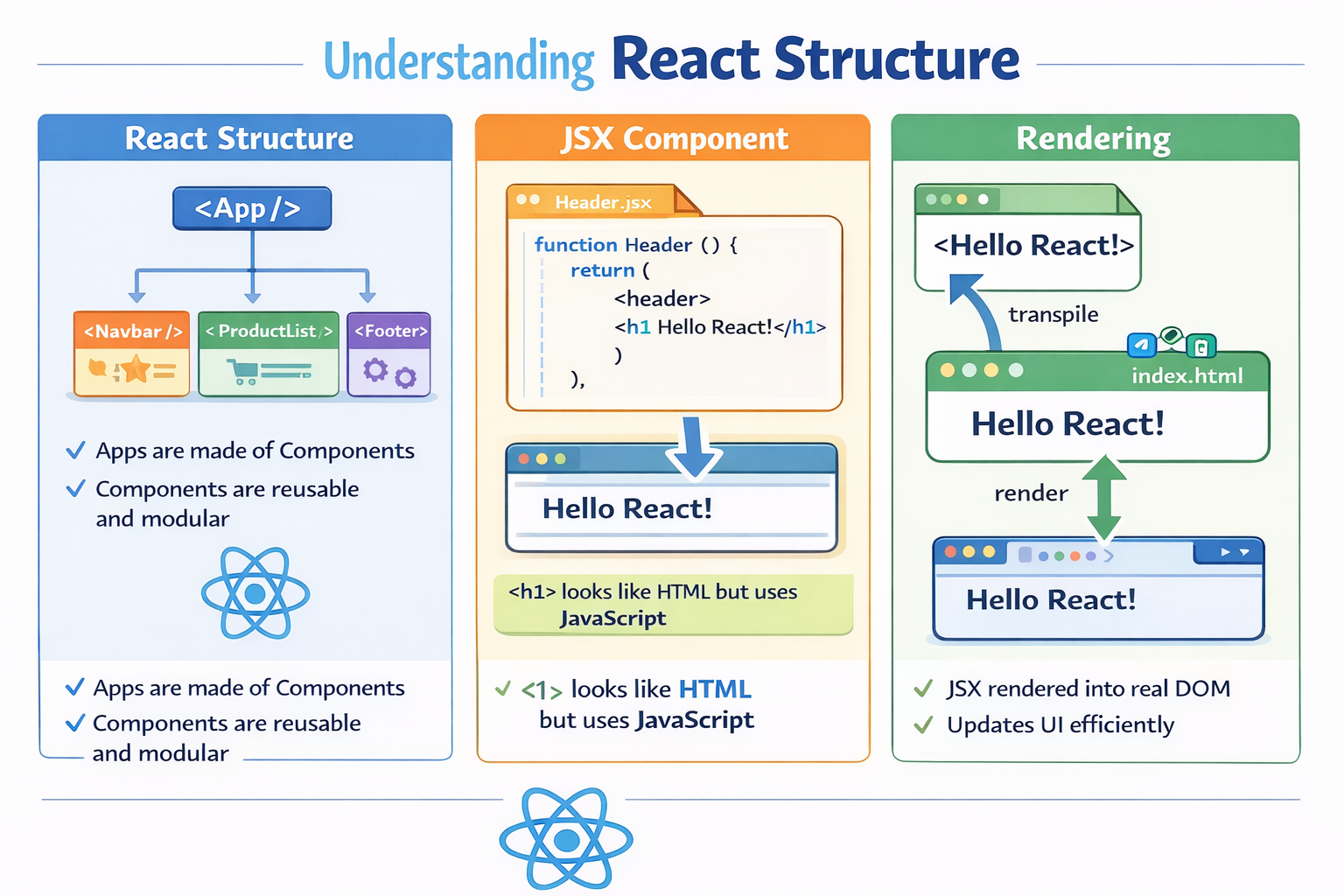
A React application is built using components.
Example structure:
App
 ├── Header
 ├── Main
 │    └── Product
 └── Footer
Key Rule
Everything in React is a component.
Each component handles a small part of the UI.
Installing React (Quick Start)
Recommended Method: Vite
Open your terminal and run:
npm create vite@latest my-react-app
cd my-react-app
npm install
npm run dev
This will start your React app in the browser.
Your First React Component
function App() {
  return <h1>Hello React</h1>;
}

export default App;
Important Points
- This is a functional component
- React components return JSX
- The component name must start with a capital letter
What is JSX?
JSX looks like HTML but works inside JavaScript.
Example:
const name = "Vibha";

<h1>Hello {name}</h1>
Why JSX?
- Easier to read
- Combines UI and logic
- Allows JavaScript inside
{}
JSX is converted into JavaScript before running in the browser.
How Rendering Works in React
Rendering means converting JSX into real DOM elements.
React Rendering Flow
- JSX is written
- React creates a Virtual DOM
- React compares changes
- Only updated parts are rendered
Benefit
- Faster UI updates
- Better performance than traditional DOM manipulation
React Hooks Explained (Core Concept)
Hooks allow functional components to use React features like state and lifecycle.
useState – Store and Update Data
const [count, setCount] = useState(0);

<button onClick={() => setCount(count + 1)}>
  Click {count}
</button>
Used for:
- Counters
- Form inputs
- Toggle buttons
useEffect – Handle Side Effects
useEffect(() => {
  console.log("Page loaded");
}, []);
Used for:
- API calls
- Page load logic
- Timers
useContext – Share Data Easily
Used to avoid props drilling.
Common use cases:
- User authentication
- Theme switching
- Language selection
useRef – Direct DOM Access
inputRef.current.focus();
Used for:
- Input focus
- Storing values without re-render
useMemo & useCallback – Performance Optimization
- useMemo → Saves heavy calculations
- useCallback → Saves function references
Used mostly in large applications.
React Routing Explained
Routing allows navigation between pages without reloading.
Example:
<Route path="/about" element={<About />} />
Common Routes
//about/contact/products
Benefits
- Fast navigation
- Single Page Application experience
React vs Next.js vs TypeScript (Quick Overview)
React
- JavaScript UI library
- Component-based
- No SEO or routing by default
Next.js
- Framework built on React
- SEO support
- File-based routing
- Server-side rendering
TypeScript
- JavaScript with type safety
- Prevents runtime errors
- Used with React and Next.js
Best Industry Combination
Next.js + React + TypeScript
Best Practices for React Developers
- Keep components small and reusable
- Avoid unnecessary state
- Use meaningful variable names
- Manage effects properly
- Optimize performance only when needed
Mini Project Ideas to Practice React
- Counter App
- Todo List
- Blog UI
- Product Listing Page
- Admin Dashboard UI
Practicing real projects is the fastest way to learn React.
React Learning Roadmap
Step 1
- JavaScript basics (ES6)
Step 2
- React fundamentals
- JSX and components
Step 3
- Hooks and routing
Step 4
- Next.js and TypeScript
Step 5
- Projects + GitHub portfolio
Final Thoughts
React is not difficult.
It becomes easy when you clearly understand:
- Components
- JSX
- Hooks
- Routing
Once these fundamentals are strong, you can confidently build real-world web applications.


Leave a Reply